

Module 03 · For the distributor
Distribution is complicated. Managing it shouldn’t be.
From orders to deliveries, stock to payments. Less manual work. More control.

At the office
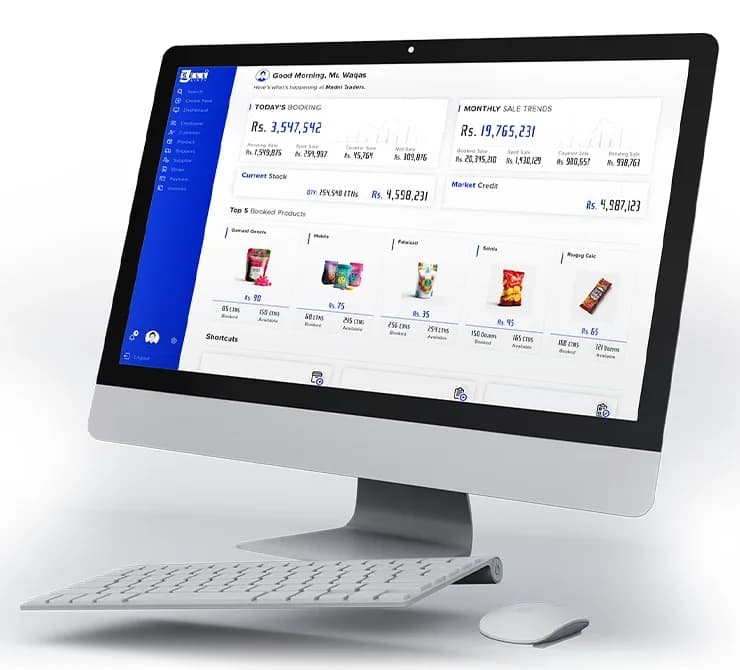
The distributor’s day. On one screen.
Orders from every booker, today’s sales, stock and market credit, adding up live as the day goes on.
One order’s journey
Follow one order. To the shop and back.
7:00 pm · The day before
Stock checked. Load ready.
SELL 360 automatically checks stock availability before creating a load. No checking each booker’s orders manually.
8:00 am · At the warehouse
Dispatch the van
Assign the delivery salesman and prepare load sheets and bills. Short on stock? Split the load and keep the extra issue on record.
11:00 am · At the shop
Deliver the order
Record what was delivered, what came back and how it was paid. Cash, cheque or credit, with offers worked out again on the changed order.
7:00 pm · Back at the warehouse
Close the day
Match stock issued and returned, money received and expenses. What is still due is clear before anyone goes home.
Out for delivery
One van. Twelve shops. Every rupee accounted for.
Follow a van from loading to the last shop. The day close builds as it goes: orders delivered, short deliveries, returns, cash, cheques and credit, closed to a zero van balance.
- 1Loaded and stock validated
- 2Delivered shop by shop
- 3Closed to a zero balance
In the detail
Every load. Every change on record.
When a delivery changes, the record changes with it. So the review starts from what really happened.
Stock and loads
Split loads
See sellable stock less allocation. Split a load when it cannot all go at once, with extra and total issue kept apart.
Returns
Returns by condition
Sellable, unsellable and damaged returns recorded apart, so stock stays true.
Recovery
Credit recovery
Pending bills come along on the delivery visit, even for shops outside today’s load.
Extra sales
Spot and counter
Market and walk in sales recorded in the same place as the rest.
Automated stock validation
No manual checks. No guesswork.
SELL 360 automatically validates stock availability before load creation, across orders from multiple bookers.
Placeholder screenAvailable features and configuration may vary by setup. Confirm details in a walkthrough.
Capabilities
Capabilities in Distribution.
From stock and loads to invoices and credit, each with its own page.
Products & Pricing
The right products, prices, and commercial rules across your sales network.
- Product catalogues
- Market-specific pricing
- Retailer schemes and discounts
- Distributor purchase margins
Sales Orders
Book once. Process without re-entry. Follow every order through fulfillment.
- Tap-first order booking
- Automatic trade schemes
- Offline booking and auto sync
- Phone orders
- Order processing and fulfillment
Inventory Management
Know what's available, what's committed, and what's moving.
- Stock balances
- Automatic stock validation
- Delivery loads
- Stock movements
- Returns
Primary Sales & Distributor Network
Manage stock purchases, distributor relationships, and primary sales transactions.
- Company stock purchase orders
- Sole and sub-distributor transactions
- Automatic distributor margins
- Distributor stock movement
- Primary sales records
Invoicing & Receivables
Every invoice. Every payment. Every outstanding balance.
- Retailer invoicing
- Invoice-based credit
- Payment collection
- Outstanding balances
- Ledgers and reconciliation
Retailer Management
Know your retail universe. From shop profiles and classifications to coverage and buying history.
- Retailer master data
- Classification and segmentation
- Routes and territory assignments
- Retailer activity and history
Field Management & Compliance
Joint working, retailer assessments, distributor compliance, and market intelligence. Built for field leadership.
- Manager field activities
- Joint working with bookers
- Custom assessment forms
- Distributor compliance
- Market intelligence
Connected
Where Distribution connects.
The same record carries on into the rest of SELL 360. Nothing is typed twice. Bookers send retailer orders. Authorized company managers enter distributor stock orders in Field Sales or the Field Manager App, and distributor margins apply to those purchases.
- Orders arrive by booker and date
- Prices and schemes already applied
- No orders typed twice
- Delivered stock checked on the shelf
- Tell a delivery gap from a shelf gap
- Display items tracked by shop
- Booked against delivered
- Money still due by distributor
- Returns by reason
Less paperwork. More distribution.
Orders arrive. Stock is validated. Purchase margins are applied. Automatically. Your team handles the deliveries. SELL 360 handles the calculations and checks.
Book a Demo